For years, video editors have faced a common bottleneck: the “waiting game.” Whether it was waiting for a final render to finish, proxies to generate, or audio to transcribe, these resource-heavy tasks often brought creative work to a standstill. With the release of DaVinci Resolve 21, Blackmagic Design has addressed this hurdle by introducing a robust Background Processing system designed to keep editors in their creative flow.
A New Era of Multitasking
The most significant shift from previous versions is the transition from a linear workflow to a parallel one. In older iterations of Resolve, heavy processing tasks often required the user to wait for completion before moving on to the next edit. Now, DaVinci Resolve 21 allows the software to handle output rendering, transcription, and proxy generation in the background.
This update effectively decouples the most time-consuming technical requirements from the creative interface. Editors can now initiate a high-resolution render or a lengthy AI-driven transcription and immediately return to the timeline to continue cutting their next scene.
Intelligent Resource Management
While background rendering is a massive leap forward for productivity, it is a resource-intensive process. Blackmagic has integrated several smart controls to ensure that your system’s performance remains stable.
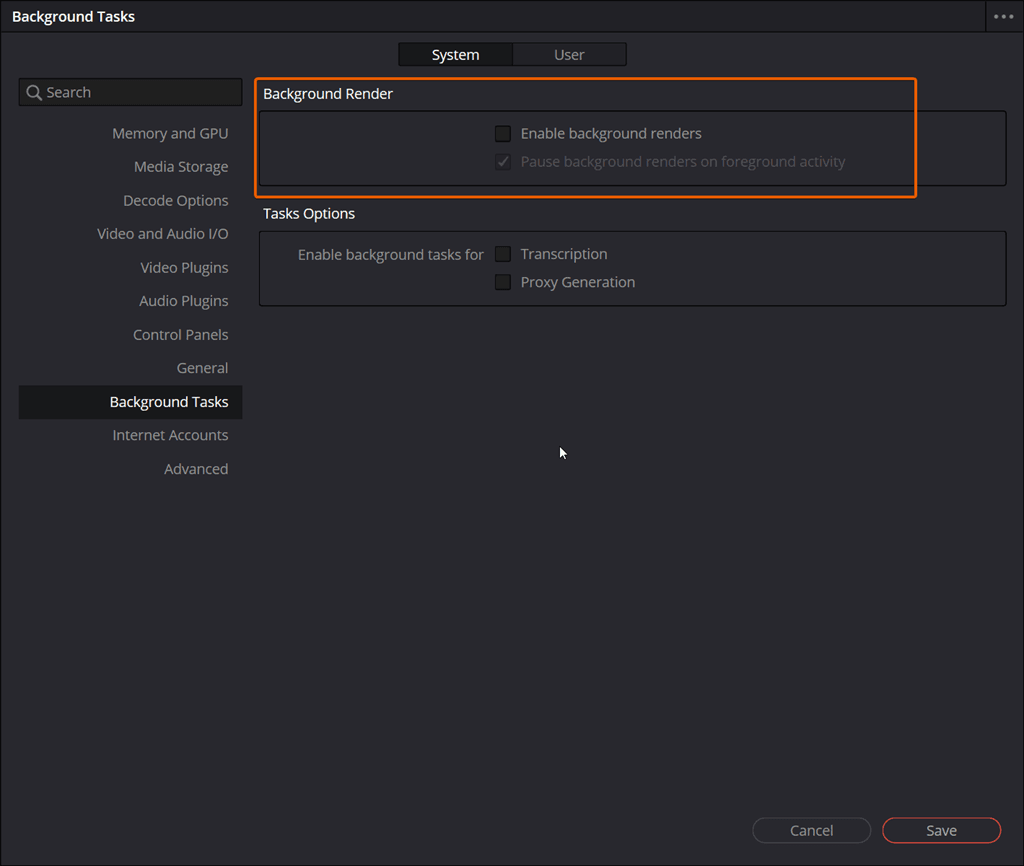
Located within the System Preferences, the new “Background Tasks” panel gives users granular control over how these tasks behave. A key highlight of this new system is the “intelligent pause” feature. To ensure the software remains snappy while you are actively editing, Resolve 21 includes an option to automatically pause background activity whenever it detects foreground activity. This ensures that your GPU and CPU cycles are prioritized for the task you are currently looking at, resuming the heavy lifting only when the system has the overhead to spare.
Seamless Monitoring
To keep users informed without cluttering the workspace, the update introduces a streamlined UI element. Much like the existing Cloud Sync progress indicator, a new Background Tasks popup has been added to the bottom toolbar. This allows for at-a-glance monitoring of render percentages and transcription status without needing to open the Deliver page or separate pop-up windows.
Important Note on Performance
Because of the significant processing power required to render or transcribe in the background, this feature is unchecked by default. This allows users on mobile workstations or older hardware to opt-in based on their specific machine’s capabilities, ensuring that the software remains stable across all desktop environments.
For professional editors handling high volumes of footage, this architectural update represents a major evolution in the Resolve ecosystem, turning what used to be “downtime” into productive “uptime.”